Embeddable JSON Form Builder
for Enterprise Applications
Add a white-label, drag-and-drop form builder to your React, Angular, Vue, or plain JavaScript application. Let users create and manage dynamic forms without code, while you retain full control over the interface, business logic, and data.
Trusted by developers at












Why Teams Choose Survey Creator
-
Integrate in days, not months
-
Framework-independent core
-
Native rendering packages for React, Angular, and Vue


-
Reusable form configuration in JSON
-
Full control over data, logic, and UI
-
Faster changes, fewer bottlenecks


-
Tailored UX across users
-
Self-service form creation
-
Consistent, governed experience


Turn Forms into JSON Configuration, Not Code
Every form update doesn’t have to become a ticket for engineering. Give your business teams self-service form management.
Building forms directly in application code works well at first. But as forms grow more complex, even minor changes to fields, validation rules, or conditional workflows can require development time, code reviews, and new releases.
Managing ten forms this way may be straightforward. Managing hundreds across different teams, products, and regions quickly becomes a maintenance challenge.
Survey Creator replaces hardcoded form definitions with structured JSON schemas that describe a form’s fields, layout, validation, calculations, and conditional logic.
A schema can describe:
-
Structure
What fields exist and how they are organised
-
Conditional logic
Which fields appear and when
-
Workflows
Page order, branching paths, and multi-step navigation
-
Validation
What is required, what formats are allowed, and what rules apply
-
Calculations
Derived values that update automatically


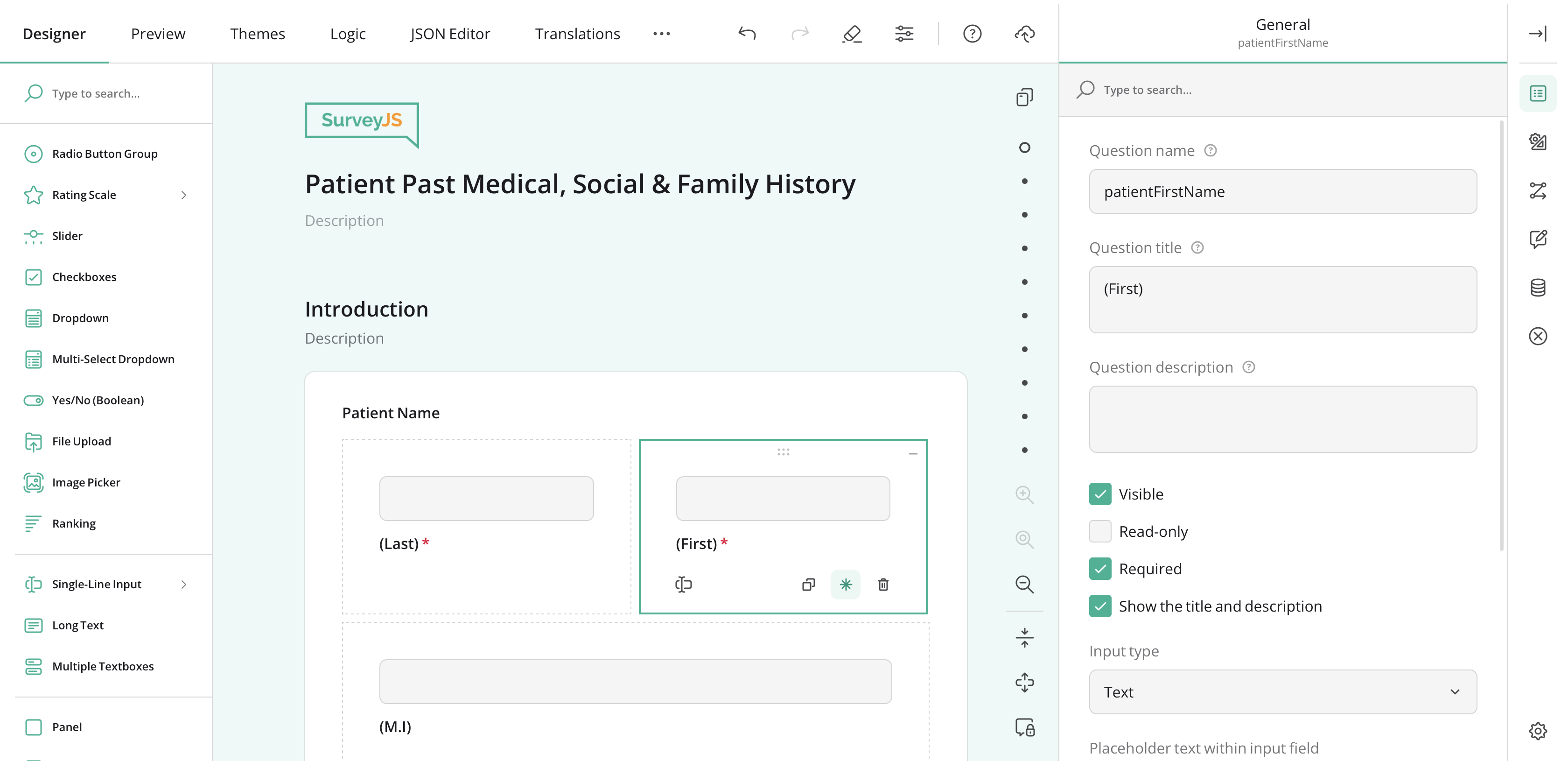
With Survey Creator, developers integrate a reusable form builder that enables business teams to create and update forms through an intuitive drag-and-drop interface. Each form is stored as a JSON configuration that can be updated without modifying application code or redeploying the application.
The result is a better division of responsibility:
-
Business teams make changes without waiting for every update to enter a sprint.
-
Developers keep control over architecture, data flow, and quality.
-
Teams collaborate more effectively around a shared system rather than scattered requests.
-
Business users gain autonomy. Developers keep control. Everyone moves faster.

Integrate with Just a Few Lines of Code
Survey Creator core and its rendering components are distributed as npm packages. Embed Survey Creator into your application, keep full control over your data, and deliver a native experience that your end users will love.
SurveyJS separates form logic from rendering. Shared functionality lives in the framework-independent survey-creator-core, while rendering packages display the form builder UI in React, Angular, Vue, Next.js, jQuery, and plain JavaScript applications. All packages are distributed through npm.
Select your frontend and see how little code is needed to embed the form builder in your app.
import { Component } from "@angular/core";
import { SurveyCreatorModel } from "survey-creator-core";
import { SurveyCreatorModule } from "survey-creator-angular";

const creatorOptions = { autoSaveEnabled: true };

@Component({
    selector: "app-root",
    imports: [SurveyCreatorModule],
    template: `<survey-creator [model]="creator"></survey-creator>`
})
export class AppComponent {
    creator = new SurveyCreatorModel(creatorOptions);
}
import { SurveyCreator, SurveyCreatorComponent } from "survey-creator-react";
import "survey-core/survey-core.min.css";
import "survey-creator-core/survey-creator-core.min.css";
const creatorOptions = { autoSaveEnabled: true };
export function SurveyCreatorWidget() {
const creator = new SurveyCreator(creatorOptions);
return <SurveyCreatorComponent creator={creator} />;
}<script setup lang="ts">
import { SurveyCreatorModel } from "survey-creator-core";
import "survey-core/survey-core.min.css";
import "survey-creator-core/survey-creator-core.min.css";
const creatorOptions = { autoSaveEnabled: true };
const creator = new SurveyCreatorModel(creatorOptions);
</script>
<template>
<SurveyCreatorComponent :model="creator" />
</template>import $ from "jquery";
import { SurveyCreator } from "survey-creator-js";
import "survey-core/survey-core.min.css";
import "survey-creator-core/survey-creator-core.min.css";
const creatorOptions = { autoSaveEnabled: true };
const creator = new SurveyCreator(creatorOptions);
$(function () {
creator.render(document.getElementById("surveyCreator"));
});import { SurveyCreator } from "survey-creator-js";
import "survey-core/survey-core.min.css";
import "survey-creator-core/survey-creator-core.min.css";
const creatorOptions = { autoSaveEnabled: true };
const creator = new SurveyCreator(creatorOptions);
document.addEventListener("DOMContentLoaded", () => {
creator.render(document.getElementById("surveyCreator"));
});200k+
weekly downloads
Make Forms Part of the Product,
Not an External Tool
Deliver native experience to your users, so they can stay inside your product — visually, technically, and mentally.
A lot of businesses use external form platforms early on. It works at first, but then over time the experience feels disconnected. Users are redirected to a third-party interface. Branding changes. Navigation feels unfamiliar. Permissions work differently.
The workflow no longer feels like part of the product. Survey Creator is designed differently. Instead of sending users to a separate platform, it embeds directly into your application — allowing teams to deliver a fully integrated, native experience that feels consistent with the rest of the product.
SaaS Form Builders
 SaaS Form Builders
- Separate product and interface
- Vendor-controlled hosting and storage
- Inconsistent UX and branding
- Limited customization
- Usage-based pricing
Survey Creator
 Survey Creator
- Fully embedded into your application
- Integrates with your backend and database
- Complete control over UX and branding
- Native workflows and permissions
- Unlimited end users and responses
Survey Creator gives developers extensive customization control over both appearance and behavior. Teams can tailor:
-
Visual styling and branding
Align typography, colors, spacing, icons, themes, and visual patterns with the rest of the application so users never feel like they left your product.
-
Role-based experiences
Expose different functionality depending on permissions, subscription tiers, workflows, or user maturity.
-
Interface structure
Control tabs, Toolbox items, navigation, settings, and editing flows to match how your product works.
-
Custom questions and business logic
Extend the editor with custom fields, validation, workflows, and behaviours unique to your use case.


Starting with v3.0, SurveyJS introduced new design system adaptation capabilities that make it significantly easier to align Survey Creator and other SurveyJS components with your application’s visual language.
For applications built with Bootstrap, Material UI, or shadcn/ui, SurveyJS includes ready-to-use theme adapters that automatically map framework CSS variables to their SurveyJS design system counterparts. Typography, colors, spacing, control states, and other visual elements adapt to match the surrounding application with minimal effort.
For custom or hybrid design systems, use the SurveyJS brand styling skill and MCP server to help your AI coding agent analyze the app’s design tokens and generate a CSS token mapping.
Survey Creator, Your Way
Configure the form editor to match how your users actually work.
Survey Creator is powerful. But not every user needs every capability. The challenge is: how do you give users the right amount of functionality?
A simple business user may need
- A clean, guided experience
- Minimal settings to avoid mistakes
- A small set of approved question types
A power user may need
- Advanced logic
- Custom properties and validation
- Conditional multi-page workflows
- Multilingual forms
- Form calculations
Survey Creator’s UI Preset Editor lets you tailor the interface visually. Explore available features, select which tools and settings to expose, preview the result, and export your configuration as a reusable JSON preset.
- Explore
- Simplify
- Preview
- Export

- Control the Toolbox — show only what’s needed
- Set language availability
- Manage functional tabs and navigation
- Tune editor behavior to day-to-day usage
- Configure the Property Grid and default values
- Export as a reusable UI preset and apply with a few lines of code

Create a streamlined experience for beginners or a feature-rich workspace for experienced users, all without rebuilding the editor. As requirements evolve, simply update the preset to match.
Enabling White-Label,
Configurable SaaS Products
Shape the Survey Creator’s interface for each customer or plan — visually, instantly, and without any code changes.
Whatever you are building — CRM systems, healthcare software, education platforms, inspections & audits tools, or anything in between, a major use case for software development companies is: “Our customers need custom forms inside our platform”.
And the challenge is not only that customers want different forms. They also want different levels of complexity and control.

Powerful for power users. Simple for everyone.
With reusable UI presets, companies can configure different experiences from the same underlying platform.
A SaaS company might offer a Basic plan with a simplified editor and limited controls along with an Enterprise plan featuring advanced logic and inputs, integrations, multilingual support, and deeper configuration. Instead of maintaining separate implementations, the same platform serves many product variations.
This creates real business value:
-
Role- and industry-based experiences
-
Feature gating
-
Premium upsell opportunities
-
Lower implementation costs
-
Faster onboarding


Your Platform, Your data
Keep full control over where your data lives, how it’s processed, and who can access it.
Hosted form platforms often tie form creation, data collection, and storage to their own infrastructure. For organizations with strict security, compliance, or data residency requirements, this can limit flexibility and control.
SurveyJS takes a different approach. As a client-side solution, it provides the UI components for creating forms, collecting responses, and visualizing data, while your infrastructure handles storage and processing. You decide where to host your application, which backend and database to use, and how to manage security, access permissions, and compliance.
Whether you use Node.js, ASP.NET Core, PHP, Python, or another backend technology, SurveyJS integrates with your existing architecture.
Scale Your Form Experience —
Not Your Costs
Avoid the hidden costs of custom development and the scaling limits of hosted form platforms.
Custom Survey Solution
The hidden cost of forms is rarely initial development. It is maintenance.
Complexity and cost compound over time. Ongoing maintenance effort keeps growing.

- New requirements & change requests
- Edge cases & bug fixes
- Integrations & data handling
- Compliance & accessibility
- Localization & translations
- Performance & scalability
- Versioning & migrations
- Testing across browsers & devices

SaaS Survey Solution
Costs rise as you grow, need more features, or exceed usage limits.
-
Starter
- Basic forms
- Limited responses
- Referral badges
$ -
Team
- More responses
- More users
- Remove branding
- Custom subdomain
$$ -
Business
- Single Sign-On (SSO)
- User management
- Data Exports
- Priority support
- Analytics
$$$ -
Enterprise
- Extra seats
- Additional responses
- API / Webhooks limits
- More storage
- Premium support
- Advanced features
$$$$

The trade-off
- Vendor lock-in
- Limited customization
- Data hosted by vendor
- Pricing tied to usage, seats, and features
- Harder to predict long-term cost
- Harder to ensure compliance
Survey Creator
One-time developer licensing, unlimited usage, and full ownership of your data.
-
Deploy where you choose
-
Store in your own database or cloud
-
Full control over security and compliance
-
Integrate with any backend system
-
Scale without per-user or response fee
-
Pay only for developer seats

Multi-User Form Editing
Build large forms together, not one section at a time.
As forms grow in size and complexity, they rarely remain the responsibility of a single person. Enterprise onboarding workflows, healthcare questionnaires, insurance applications, and multilingual forms often require contributions from multiple teams and departments.
Survey Creator’s Multi-User Form Editing allows multiple users to work on the same form simultaneously. Teams can build different sections in parallel, make updates in real time, and contribute without waiting for others to finish first.
A dedicated Translation tab enables translators to work on different language versions at the same time. The result — faster form creation and delivery.

Trusted by Development Teams Worldwide
SurveyJS powers secure internal data collection systems and form-building capabilities in SaaS products.












Frequently Asked Questions
What is Survey Creator?
What is Survey Creator?
Survey Creator is an embeddable drag-and-drop form builder component that you can embed into your own web application. It allows non-tech users to create, edit, and manage dynamic forms through a no-code drag-and-drop interface, while developers retain control over data flow, permissions, backend integration, business logic, and the overall user experience. Survey Creator produces form definitions as JSON schemas, which can be stored in your own database and rendered later in your application using SurveyJS Form Library.
Can I white-label the Survey Creator UI?
Can I white-label the Survey Creator UI?
Yes. Survey Creator is designed for white-label use cases and can be customized to match your application’s branding and user experience. You can adjust built-in UI themes, colors, typography, spacing, icons, UI structure, available tabs, Toolbox items, Property Grid settings, and editor behavior. With SurveyJS v3.0, teams can also use design-system adaptation options to make SurveyJS components feel consistent with applications built on Bootstrap, Material UI, shadcn/ui, or custom and hybrid design systems. This allows developers to deliver a form-building experience that feels native to their product, rather than like an external tool.
Is Survey Creator self-hosted?
Is Survey Creator self-hosted?
Survey Creator is embedded and hosted as part of your own application. It is a client-side component, not a hosted form builder platform. You decide where the application runs, which backend it connects to, where form schemas are stored, and how submitted data is processed. SurveyJS provides the UI for creating and editing forms; your team controls hosting, storage, security, and infrastructure. Because you retain full ownership of the application and data, you can implement the logging, monitoring, retention policies, and regulatory controls required for your organization's compliance requirements.
Does it support conditional logic?
Does it support conditional logic?
Yes. Survey Creator supports advanced conditional logic for building dynamic forms that adapt to user input. It includes a dedicated Logic tab where users can configure rules without writing code. You can create skip logic, branching, display logic, conditional validation, and other dynamic workflows. Conditions can be applied at different levels, from entire pages and panels to individual questions and even specific choice options.
Is Survey Creator open source?
Is Survey Creator open source?
Survey Creator is a commercial product. However, it is built on top of the SurveyJS Form Library, which is open source and available under the MIT license. The Form Library is responsible for rendering forms, collecting responses, and executing form logic.
The Survey Creator component adds a visual drag-and-drop interface for creating and managing JSON-based forms and requires a commercial license.
The source code for both SurveyJS Form Library and Survey Creator is publicly available on GitHub, allowing developers to review the implementation, contribute to the open-source libraries, and evaluate the product before purchase.
SurveyJS uses a developer-based licensing model. A license is required only for developers who work with the SurveyJS API and implement SurveyJS functionality in an application. There are no additional fees for end users, respondents, forms, submissions, servers, or deployments.
Does Survey Creator store data?
Does Survey Creator store data?
No. Survey Creator does not store your forms or responses on SurveyJS servers. SurveyJS gives you full control over the data flow between client and server without a third party involved. You decide where to save form JSON schemas, how to process submitted responses, and which database or backend system to use, while using SurveyJS for the UI.
This makes Survey Creator particularly well suited for highly regulated industries such as healthcare, banking and financial services, inspections, auditing, insurance, government, and other sectors that require strict control over data storage, access, and processing.
How is it different from Typeform or Microsoft Forms?
How is it different from Typeform or Microsoft Forms?
Typeform, Microsoft Forms, Google Forms, and similar tools are hosted form platforms. They are designed for creating forms in an external service, often with vendor-controlled hosting, predefined workflows, and pricing based on seats, responses, features, or usage.
Survey Creator is different because it is an embeddable form builder component for your own application. You integrate it into your product, customize the UI, connect it to your own backend, store data in your own systems, and control the full user experience.
SurveyJS also does not limit the number of admins, respondents, forms, monthly submissions, file uploads, or available features. This makes it better suited for companies that need unlimited usage, deep customization, and full control over data and infrastructure.
Can I embed Survey Creator in React?
Can I embed Survey Creator in React?
Yes. Survey Creator can be embedded into React applications using the Survey Creator React rendering package.
Can I add Survey Creator to my SaaS application?
Can I add Survey Creator to my SaaS application?
Yes. You can embed Survey Creator into any web application, including SaaS products built on single-tenant, multi-tenant, or hybrid architectures, and allow customers to create and manage their own forms and data collection workflows.
Survey Creator supports role-based and tenant-specific UI customization and configuration, so you can tailor its capabilities by user role, subscription tier, or tenant.
A SurveyJS license is required only for developers who work with the SurveyJS API. There are no additional licensing fees for your end users, tenants, forms, or submissions.
Does it support Angular and Vue?
Does it support Angular and Vue?
Yes. Survey Creator natively supports Angular and Vue, along with React and plain JavaScript.
Survey Creator uses a framework-independent survey-creator-core with framework-specific rendering packages, so teams can integrate the form builder into different frontend stacks while keeping form logic and JSON configuration consistent across applications. Please refer to the SurveyJS Architecture guide to learn more.
Still Got Questions?
Check our FAQ or Contact Us