Integrate SurveyJS Libraries with Backend
SurveyJS includes several client-side libraries that work in a web browser. Use these libraries as building blocks for your frontend:
- SurveyJS Form Library embeds a survey onto a web page.
- SurveyJS Creator allows users to create/modify survey structure.
- SurveyJS Dashboard displays survey results.
- SurveyJS PDF Generator allows users to save your survey as a PDF document.
SurveyJS can work with any server-side framework and database. This help topic describes the main aspects that you should take into account when you integrate SurveyJS with your backend.
Client–Server Interaction
To communicate with the server, SurveyJS libraries use JSON objects. The following diagram illustrates the communication process:
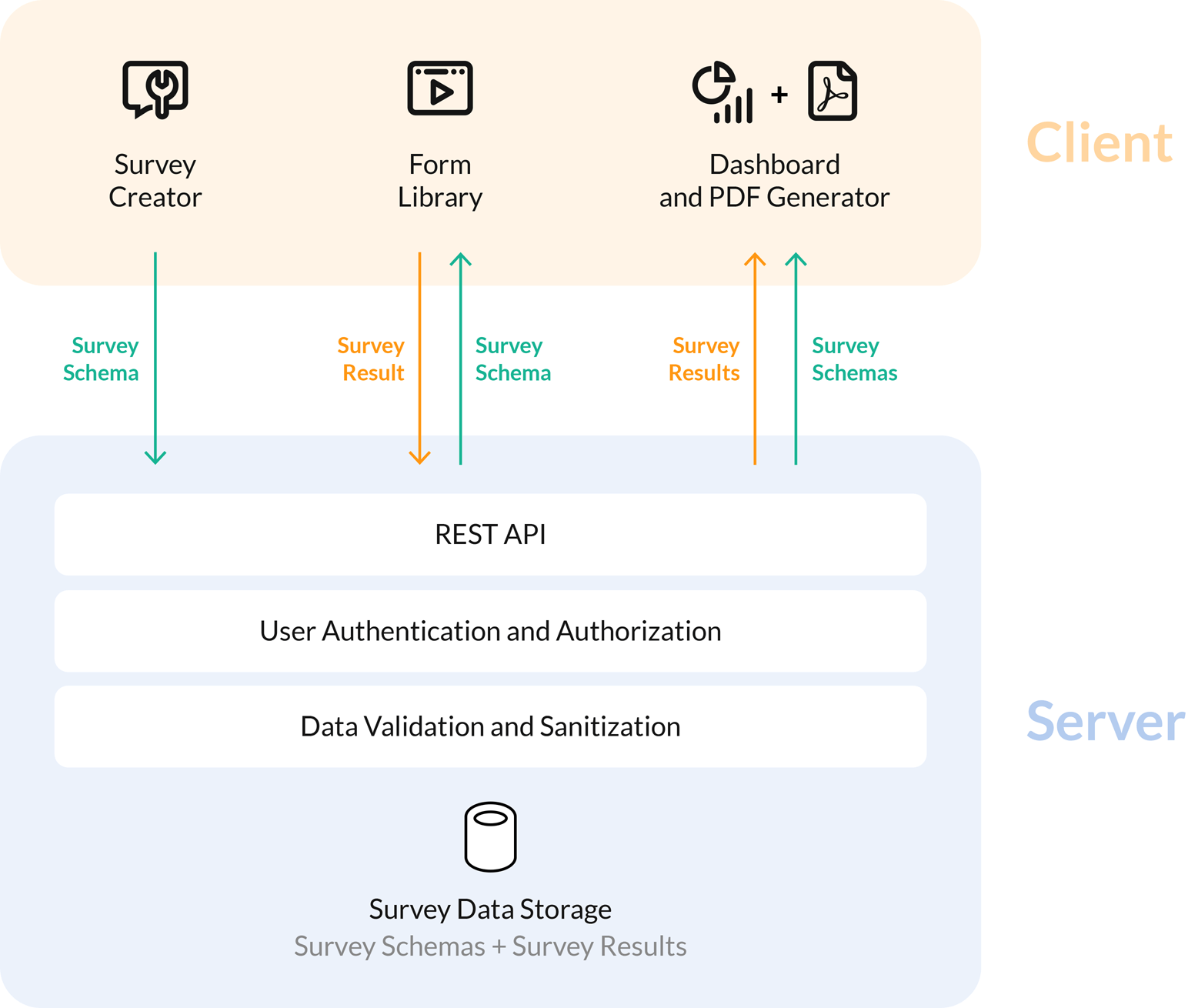
SurveyJS libraries send and receive two types of JSON objects:
Survey schema
Describes the survey structure—pages, panels, and questions.Survey result
Contains a respondent's answers to survey questions.
Your backend development team should implement server-side code that stores these JSON objects in a database and delivers them to and from the client side.
Server-Side Implementation
Backend implementation is a custom development task that lies beyond the scope of SurveyJS libraries. However, we can highlight implementation aspects that facilitate successful SurveyJS integration.
REST API
Design a REST API endpoint that accepts JSON data in requests and sends JSON data in responses.
User Authentication and Authorization
To authenticate a user that sends a request, determine their identity. To authorize the user, determine the resources they can access. Prevent users from accessing API operations outside their predefined roles.
Data Validation and Sanitization
Validate API calls and sanitize user input to prevent cross-site request forgery (CSRF), cross-site scripting (XSS), and SQL injection (SQLi) attacks.
In addition, you can deploy a backend service that validates survey JSON schemas and user responses. For details, source code, and setup instructions, refer to the following GitHub repository:
Survey Data Storage
A survey management application should include a database to store survey schemas and results. Depending on your business needs, you can build an on-premises data storage or host data in a cloud service.
In the simplest case, the database can include two tables: one for survey schemas and one for survey results. The tables should establish a one-to-many relationship (one schema to many survey results) and can contain the fields described below.
SurveySchemas
id- A unique identifier of a survey schema.content- A JSON object or text string that contains the survey schema.
SurveyResults
id- A unique identifier of a survey result.survey_schema_id- A required field that refers toSurveySchemas.id.content- A JSON object or text string that contains the survey result.
Each database can also include additional fields as required. For example, if you need to track who and when created or changed a survey schema, you can add the following fields to the SurveySchemas table: createdDate, createdByUser, changedDate, and changedByUser.
The following table illustrates permissions that each SurveyJS component needs for correct operation:
| SurveyJS Component | SurveySchemas |
SurveyResults |
|---|---|---|
| Form Library | Read | Create |
| Survey Creator | Create / Read / Update | - |
| Dashboard | Read | Read |
| PDF Generator | Read | Read |
Note that SurveyJS Dashboard needs to read one record from SurveySchemas and all records with the same survey_schema_id from SurveyResults. SurveyJS PDF Generator needs to read one record from SurveySchemas and, optionally, one record with a desired result from SurveyResults.
Examples
Choose a guide for your backend. Each guide includes code examples for running forms, analyzing results, editing forms, and running SurveyJS on the server.
- Next.js
- Express (Node.js)
- ASP.NET Core
- FastAPI (Python)
- Django (Python)
- Spring Boot (Java)
- Laravel (PHP)
To view the examples that accompany these guides, along with other SurveyJS integration examples, see the following page:
Send feedback to the SurveyJS team
Need help? Visit our support page