SurveyJS v3.2.1
Released: October 13, 2026
SurveyJS v3.2.1 introduces NuGet packages for integrating its components into ASP.NET Core and Blazor applications without Node.js, npm, or a bundler. This release also enhances collaborative form editing and includes bug fixes and minor enhancements.
For an overview of the major features introduced in SurveyJS v3.0, see:
NuGet Packages
SurveyJS is now available on NuGet for ASP.NET Core and Blazor applications targeting .NET 8 or later. The packages include prebuilt JavaScript and CSS assets, so no Node.js, npm, or bundler setup is required for SurveyJS components.
| Product | NuGet packages |
|---|---|
| Form Library | SurveyJS, SurveyJS.Core, SurveyJS.JsUi |
| Survey Creator | SurveyJS.Creator, SurveyJS.Creator.Core, SurveyJS.Creator.JsUi |
| Dashboard | SurveyJS.Analytics |
| PDF Generator | SurveyJS.Pdf |
SurveyJS is a metapackage that installs SurveyJS.Core and SurveyJS.JsUi. SurveyJS.Creator installs the Survey Creator components and their Form Library dependencies.
You can install the packages through Visual Studio's NuGet package manager or the .NET CLI. Keep all SurveyJS packages in your application on the same version.
Quick Start
Install the packages you need.
For example, install Form Library by running this command from your project directory:dotnet add package SurveyJSEnsure your application serves static web assets.
For .NET 8, configureapp.UseStaticFiles()inProgram.cs. With newer templates, retain the provided static asset configuration.Reference the product styles and scripts in your page or shared layout.
For Form Library, use:<link rel="stylesheet" href="_content/SurveyJS.Core/survey-core.min.css" /> <script src="_content/SurveyJS.Core/survey.core.min.js"></script> <script src="_content/SurveyJS.JsUi/survey-js-ui.min.js"></script>Use the regular JavaScript API to work with the component.
For example, create a form withnew Survey.Model(json)and render it withsurvey.render(...). In Blazor, initialize the component through JS interop inOnAfterRenderAsyncafter its container has rendered.
The packages include translation dictionaries, predefined themes, and theme adapters for Bootstrap, MUI, and shadcn/ui. However, third-party dependencies are not bundled—you need to load Chart.js, Plotly.js, or Tabulator for Dashboard and jsPDF for PDF Generator separately. Each package's readme includes full setup instructions.
Form Library is MIT-licensed. Survey Creator, Dashboard, and PDF Generator require commercial developer licenses.
[Survey Creator] Collaborative Form Editing Enhancements
Collaborative form editing now prevents simultaneous edits to the same survey element or logic rule and provides more detailed version history.
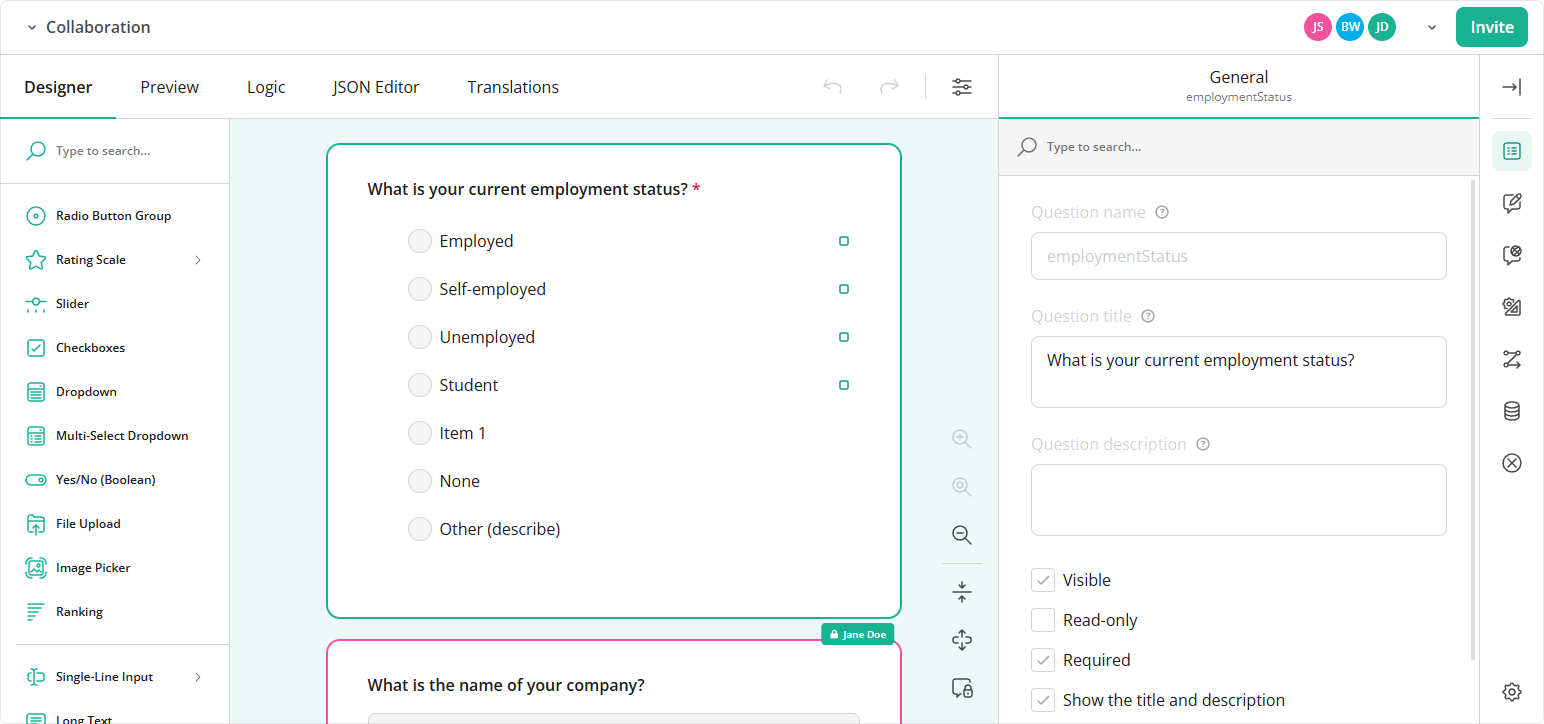
Survey Elements Are Locked During Editing
While one author edits a survey element, other authors are blocked from editing it.
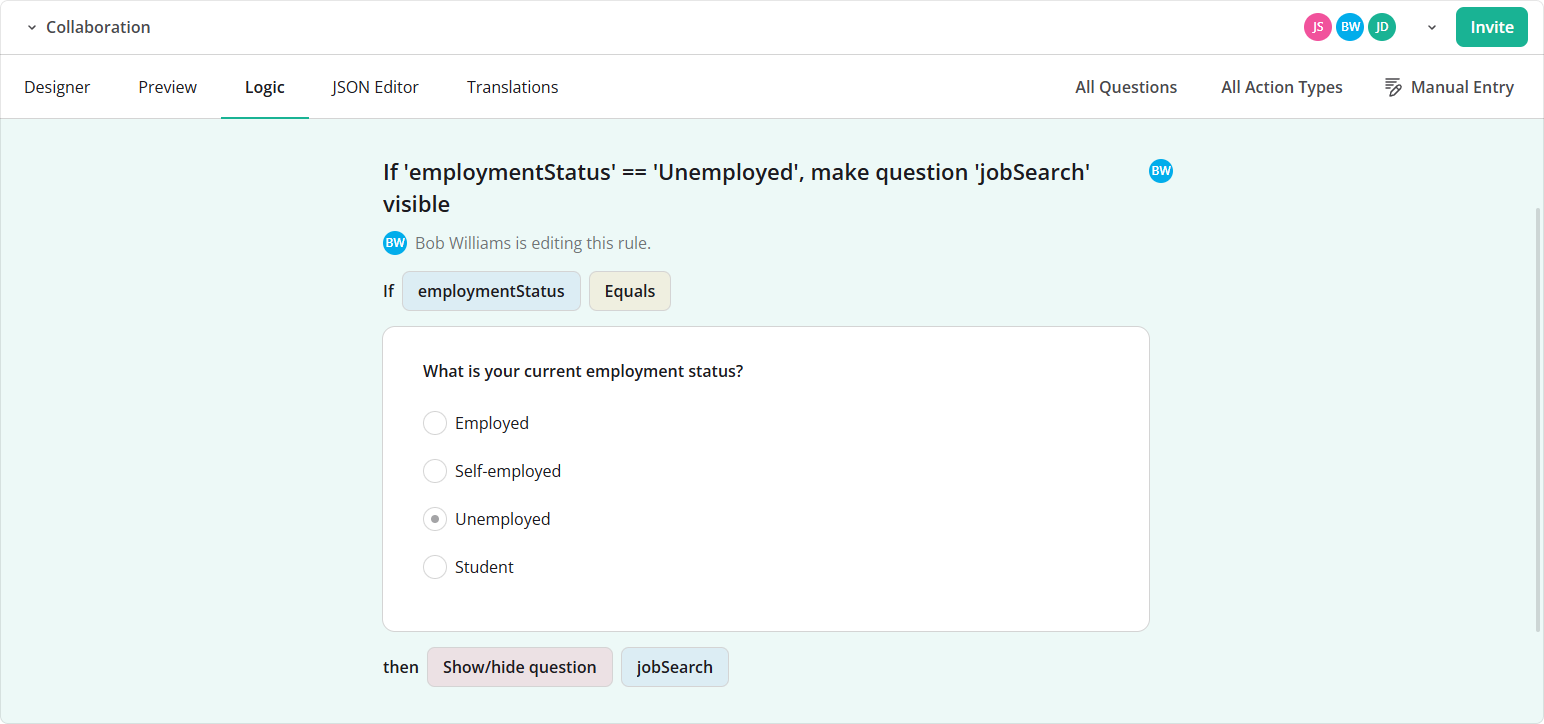
Logic Rules Are Locked During Editing
Logic rules in the Logic tab follow the same behavior: while one author edits a rule, other authors cannot edit it.
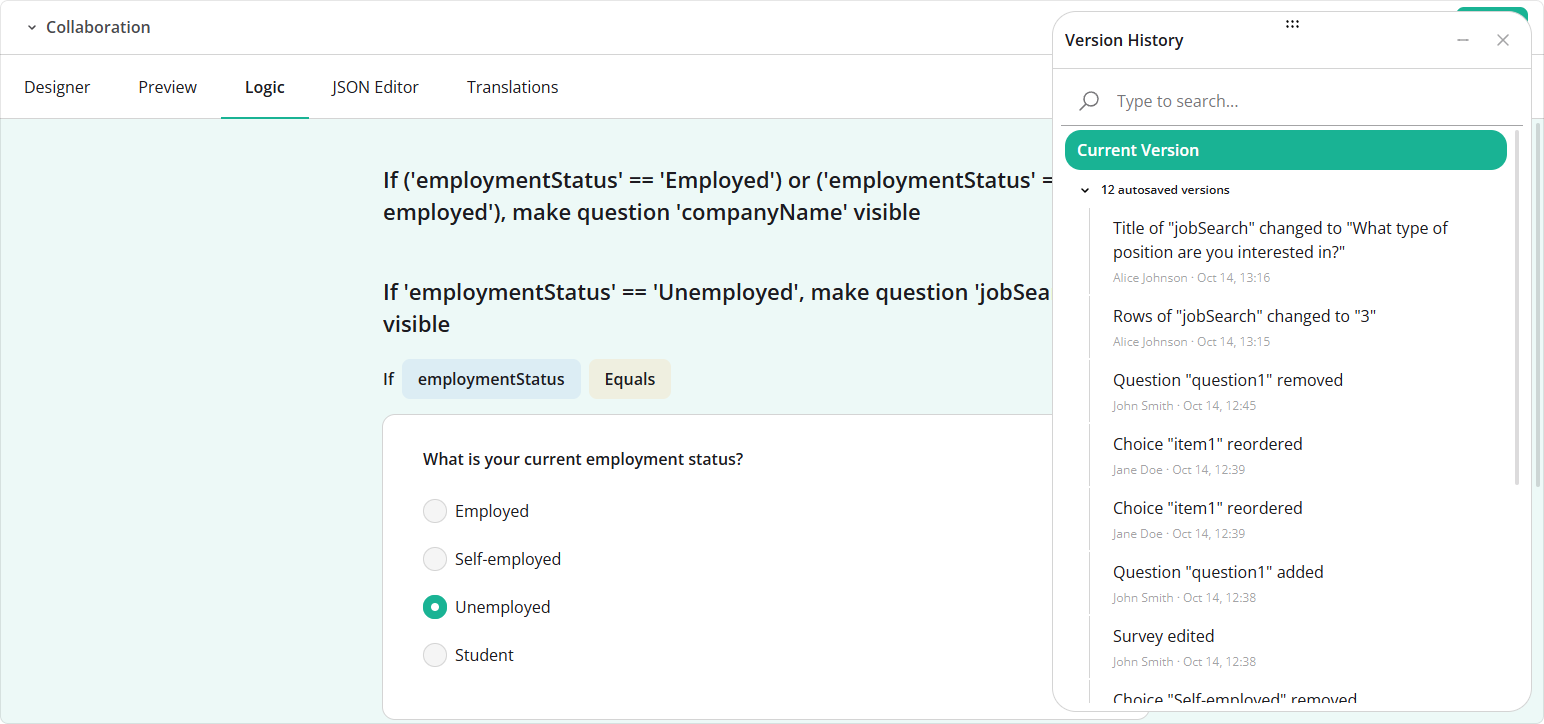
More Detailed Version History
Version history now shows who made each change and the new value of the changed property, alongside the existing timestamp and change details.
New Help Topics
Dashboard: Localization & Globalization
PDF Generator: Localization & Globalization
Bug Fixes and Minor Enhancements
Form Library
- [survey-core] Memory leak:
TOCModelleaves an anonymous scroll listener attached to the survey root element (#12003) - [survey-*-ui] Memory leak: Scroll listeners retain replaced survey models because
beforeDestroySurveyElement()is never called (#12004) - Linter incorrectly reports Multiple Textbox item names that contain dots (#11963)
- Question-per-page and input-per-page modes: Center survey content vertically within the container (#11937)
- Multi-Select Dropdown (Tag Box): "Remove" button has no pressed state (#4927)
defaultValueExpressionincorrectly overrides a value explicitly set insurvey.data(#11985)- [Survey Creator] Property Grid: Cannot clear the selected value in the "Region" dropdown (#11971)
- [Vue 3] Dynamic Panel: Fields in the next panel remain hidden even when values in the previous panel satisfy their visibility conditions (#11978)
- Preview page unexpectedly reapplies default question values (#11987)
- Dynamic Panel: "Next" button caption does not update when the survey locale changes (#11979)
- Progress bar doesn't visually indicate pages with unanswered fields (#11999)
- Topmost question is hidden when navigating to the next page (#11974)
- Ranking: Update icons used for ranking items (#11982)
- Specialized question type with
inheritBaseProps: true:toJSON()omitsdescriptionandrequiredErrorTextwhen they are absent fromquestionJSON(#11973)
Dashboard
- Chart.js horizontal bar chart displays percentages in reverse order when
showPercentagesis enabled (#858)
How to Update SurveyJS Libraries in Your Application
To update your application to SurveyJS v3.2.1, install the packages you use or replace your existing script and stylesheet links with the versioned links below:
Angular
npm i survey-core@3.2.1 survey-angular-ui@3.2.1
npm i survey-creator-core@3.2.1 survey-creator-angular@3.2.1
npm i survey-analytics@3.2.1
npm i survey-pdf@3.2.1
React
npm i survey-core@3.2.1 survey-react-ui@3.2.1
npm i survey-creator-core@3.2.1 survey-creator-react@3.2.1
npm i survey-analytics@3.2.1
npm i survey-pdf@3.2.1
Vue.js
npm i survey-core@3.2.1 survey-vue3-ui@3.2.1
npm i survey-creator-core@3.2.1 survey-creator-vue@3.2.1
npm i survey-analytics@3.2.1
npm i survey-pdf@3.2.1
HTML/CSS/JavaScript
<link href="https://unpkg.com/survey-core@3.2.1/survey-core.min.css" type="text/css" rel="stylesheet">
<script type="text/javascript" src="https://unpkg.com/survey-core@3.2.1/survey.core.min.js"></script>
<script type="text/javascript" src="https://unpkg.com/survey-js-ui@3.2.1/survey-js-ui.min.js"></script>

<script src="https://unpkg.com/survey-core@3.2.1/themes/index.min.js"></script>

<link href="https://unpkg.com/survey-creator-core@3.2.1/survey-creator-core.min.css" type="text/css" rel="stylesheet">
<script src="https://unpkg.com/survey-creator-core@3.2.1/survey-creator-core.min.js"></script>
<script src="https://unpkg.com/survey-creator-js@3.2.1/survey-creator-js.min.js"></script>

<link href="https://unpkg.com/survey-analytics@3.2.1/survey.analytics.min.css" rel="stylesheet">
<script src="https://unpkg.com/survey-analytics@3.2.1/survey.analytics.min.js"></script>

<link href="https://unpkg.com/survey-analytics@3.2.1/survey.analytics.tabulator.min.css" rel="stylesheet">
<script src="https://unpkg.com/survey-analytics@3.2.1/survey.analytics.tabulator.min.js"></script>

<script src="https://unpkg.com/survey-pdf@3.2.1/survey.pdf.min.js"></script>
<script src="https://unpkg.com/survey-pdf@3.2.1/pdf-form-filler.min.js"></script>
If you are upgrading from v2.x, review the breaking changes introduced in SurveyJS v3.0 and subsequent updates.