SurveyJS v3.1.1
Released: September 23, 2026
SurveyJS v3.1.1 introduces variable presets in Survey Creator to help form authors preview survey logic with sample application data. This release also includes bug fixes and minor enhancements. For an overview of the major features introduced in SurveyJS v3.0, see:
[Survey Creator] Preview Surveys with Runtime Variables
Survey logic can depend on data supplied by your application at runtime. For example, a support form might enable priority support only for premium customers. Survey Creator v3.1.1 introduces variable presets: named sets of sample values that let form authors test these conditions in the Preview tab.
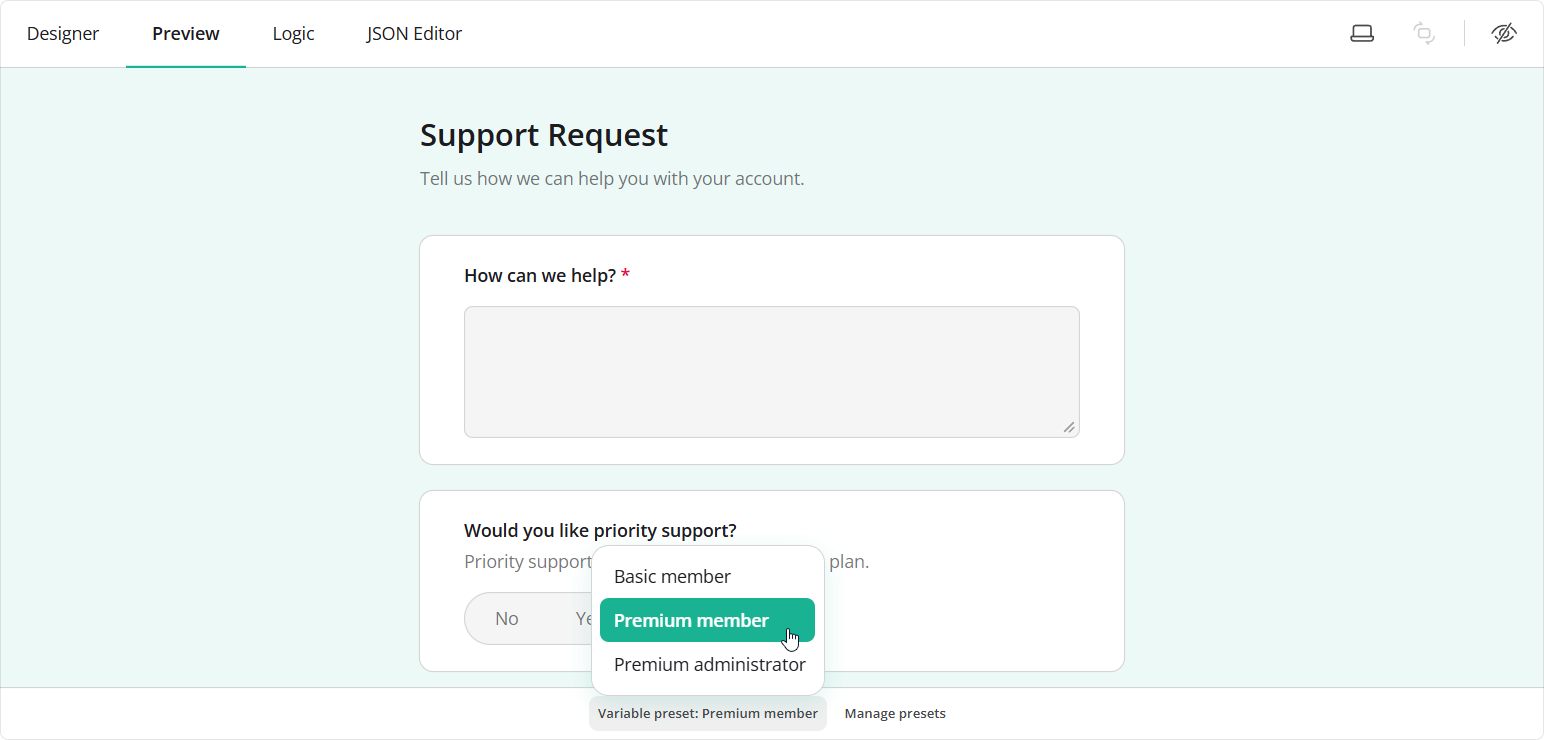
To enable this functionality, use the variablePresets object. Its definition property describes the variables and how to edit them; its presets array supplies the values to test:
const creator = new SurveyCreator.SurveyCreator({
  variablePresets: {
    definition: {
      elements: [{
        type: "dropdown",
        name: "customerTier",
        title: "Customer plan",
        choices: ["basic", "premium"]
      }]
    },
    presets: [
      { name: "Basic member", variables: { customerTier: "basic" } },
      { name: "Premium member", variables: { customerTier: "premium" } }
    ]
  }
});
Use curly brackets to reference variables in survey expressions, just as you would reference question names. In this example, enableIf enables the priority support question when customerTier is "premium":
creator.JSON = {
  elements: [{
    type: "boolean",
    name: "prioritySupport",
    title: "Would you like priority support?",
    enableIf: "{customerTier} = 'premium'"
  }]
};
creator.activeTab = "preview";
Form authors can now switch between Basic member and Premium member at the bottom of the Preview tab to test the condition. To try other values, they can click Manage presets to edit or add presets. They can also use the variables in visual condition editors.
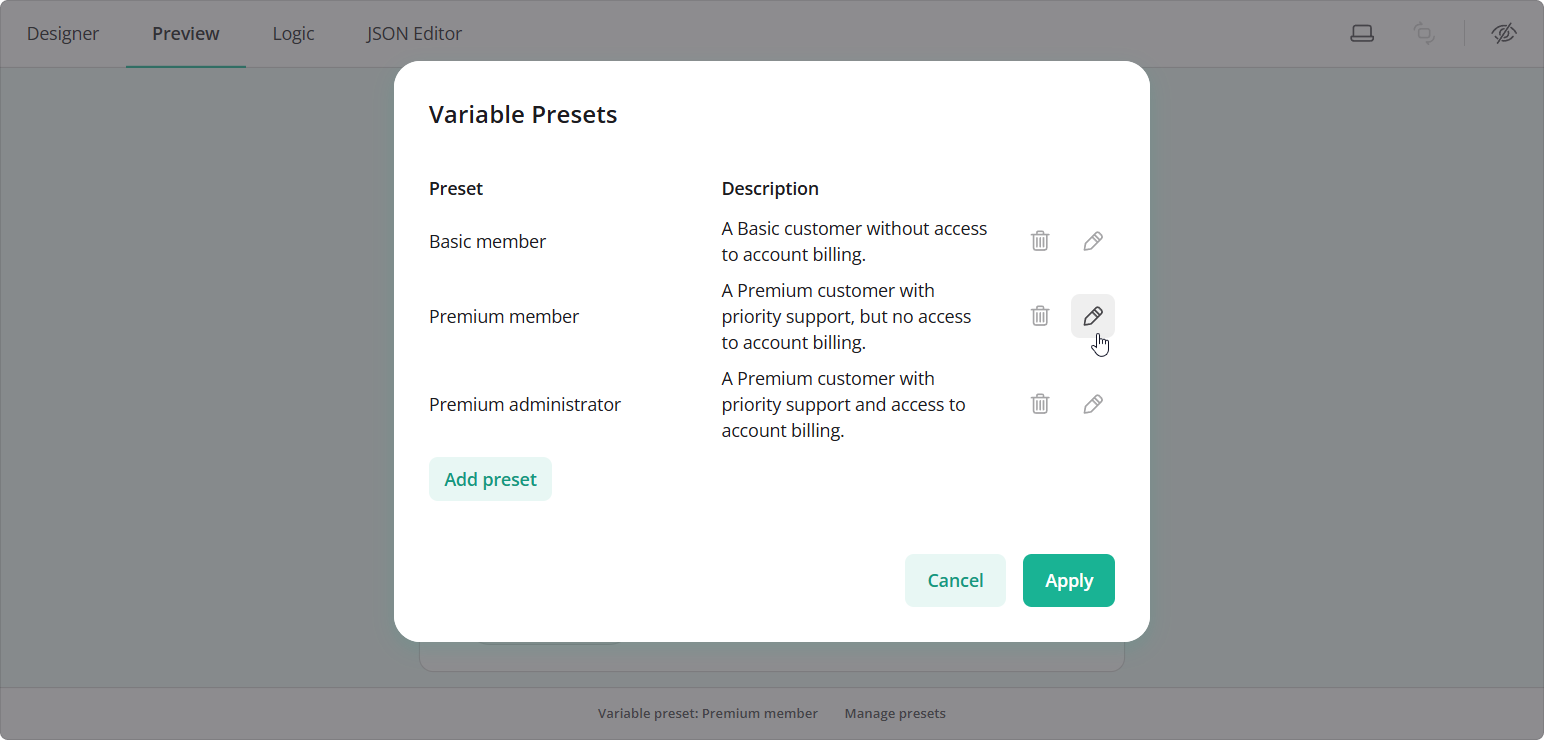
Preset edits stay in memory for the browser session. To save them for later use, handle the onVariablePresetsChanged event and pass the updated presets to your application's save function:
creator.onVariablePresetsChanged.add((_, options) => {
  if (options.reason === "edit") {
    // Replace with your application's save function.
    saveVariablePresets(options.variablePresets);
  }
});
Demo: Preview Surveys with Runtime Variables
Bug Fixes and Minor Enhancements
Form Library
- Themes fall back to Times New Roman when the recommended Open Sans font is not loaded (#11854)
- Rating Scale: Allow rate values to be selected using number keys (#11863)
- Rating Scale does not auto-advance on Enter when
autoAdvanceEnabledis enabled (#11845) - Radio Button Group with
autoAdvanceEnabledshould wait for a confirmation key before advancing after keyboard selection (#3723) - Dropdowns: Drop-down list briefly shows unfiltered choices while closing (#11821)
- Linter doesn't report names that conflict with
Object.prototypemembers (#11859) - Slider: Question root has
role="textbox", preventing screen readers from reaching the slider (#11846) - Progress bar in Pages mode: Outer buttons have larger gaps than inner buttons (#11860)
- Prototype pollution in
mergeData()andapplyTheme()(#11856) - Text question retains inapplicable min/max values after
inputTypechanges (for example, Number -> Phone) (#11875) onDynamicPanelValueChangedis not raised when a composite or custom question in a Dynamic Panel changes through an inner question (#11870)- [Survey Creator] Number field placeholder cannot be edited in the Property Grid (#11874)
Survey Creator
- Trailing spaces in the survey title are not preserved when entered on the design surface (#8004)
- Logic tab: "Set answer" action silently saves no value for composite questions (#8011)
- JSON Editor tab doesn't save changes until the user switches to another tab (#8003)
Dashboard
- Table View: Columns dropdown is missing the "Select all" and "Clear selection" commands (#855)
How to Update SurveyJS Libraries in Your Application
To update your application to SurveyJS v3.1.1, install the packages you use or replace your existing script and stylesheet links with the versioned links below:
Angular
npm i survey-core@3.1.1 survey-angular-ui@3.1.1
npm i survey-creator-core@3.1.1 survey-creator-angular@3.1.1
npm i survey-analytics@3.1.1
npm i survey-pdf@3.1.1
React
npm i survey-core@3.1.1 survey-react-ui@3.1.1
npm i survey-creator-core@3.1.1 survey-creator-react@3.1.1
npm i survey-analytics@3.1.1
npm i survey-pdf@3.1.1
Vue.js
npm i survey-core@3.1.1 survey-vue3-ui@3.1.1
npm i survey-creator-core@3.1.1 survey-creator-vue@3.1.1
npm i survey-analytics@3.1.1
npm i survey-pdf@3.1.1
HTML/CSS/JavaScript
<link href="https://unpkg.com/survey-core@3.1.1/survey-core.min.css" type="text/css" rel="stylesheet">
<script type="text/javascript" src="https://unpkg.com/survey-core@3.1.1/survey.core.min.js"></script>
<script type="text/javascript" src="https://unpkg.com/survey-js-ui@3.1.1/survey-js-ui.min.js"></script>

<script src="https://unpkg.com/survey-core@3.1.1/themes/index.min.js"></script>

<link href="https://unpkg.com/survey-creator-core@3.1.1/survey-creator-core.min.css" type="text/css" rel="stylesheet">
<script src="https://unpkg.com/survey-creator-core@3.1.1/survey-creator-core.min.js"></script>
<script src="https://unpkg.com/survey-creator-js@3.1.1/survey-creator-js.min.js"></script>

<link href="https://unpkg.com/survey-analytics@3.1.1/survey.analytics.min.css" rel="stylesheet">
<script src="https://unpkg.com/survey-analytics@3.1.1/survey.analytics.min.js"></script>

<link href="https://unpkg.com/survey-analytics@3.1.1/survey.analytics.tabulator.min.css" rel="stylesheet">
<script src="https://unpkg.com/survey-analytics@3.1.1/survey.analytics.tabulator.min.js"></script>

<script src="https://unpkg.com/survey-pdf@3.1.1/survey.pdf.min.js"></script>
<script src="https://unpkg.com/survey-pdf@3.1.1/pdf-form-filler.min.js"></script>
Review the breaking changes described above and update your application as needed. If you are upgrading from v2.x, also review the breaking changes introduced in SurveyJS v3.0 and subsequent updates.